

Are These Common Google Ads Mistakes Holding Your Campaigns Back?
Running Google Ads can be a powerful way to drive traffic, leads, and sales, but even the most experienced advertisers can fall into common traps that limit their results. Whether you’re noticing wasted spend or your ads just aren’t converting like they used to, these 10 PPC mistakes could be the culprit. The good news? They’re avoidable. By identifying and fixing these pitfalls, you’ll optimise your campaigns, reduce wasted budget, and start seeing better returns on your ad spend. Let’s dive into the mistakes you should steer clear of!
1. Don’t underestimate budget
Here’s why: People often say, “I have £100, £500, £1,000 to spend on ads each month.” But why? How did you come up with that number? Just looking at your bank balance? That’s mistake number 1.

This is one of the biggest reasons accounts underperform, and businesses lose faith in Google Ads. You need to change your mindset. Stop asking, “How much can I afford to spend?” and start thinking, “How much should I be paying per lead?” Trust us, this shift will transform your entire marketing approach—not just Google Ads.
Knowing the lifetime value of your clients is key to making informed decisions about your ad spend. The LTV represents the total revenue you can expect from a client over their relationship with your business, typically over 2–3 years.
To calculate this, consider:
-
- Average Purchase Value: How much does a client spend per transaction?
- Purchase Frequency: How often do they return to buy again?
- Customer Retention: How long do clients typically stay with you?
Once you know the LTV, combine it with your lead-to-conversion rate (the percentage of leads that become paying customers). This helps you work out how much you can afford to spend on acquiring each client through advertising.
Example: How to Calculate What You Should Spend Per Lead
Let’s break this down step-by-step:
1. Calculate the Lifetime Value (LTV) of a Client
To start, you need to work out the total value a client brings to your business over the course of their relationship with you. This involves knowing a few key metrics:
-
-
- Average Purchase Value: £200
(This is the average amount each client spends per transaction.) - Purchase Frequency: 3 times per year
(On average, each client buys from you 3 times a year.) - Customer Retention Period: 3 years
(Clients typically stay with your business for 3 years.)
- Average Purchase Value: £200
-
So, the Lifetime Value (LTV) is calculated like this:
This means that, over three years, the average client will bring in £1,800 in revenue.
2. Determine Your Lead-to-Conversion Rate
Next, you need to know your lead-to-conversion rate, which is the percentage of leads (people who express interest) that become paying clients.
Let’s say your lead-to-conversion rate is 10%. This means that for every 10 leads you generate, 1 of them will convert into a paying client.
3. Calculate the Maximum Cost-Per-Lead You Can Afford
Now, to work out how much you can afford to spend on Google Ads per lead, you’ll need to decide what portion of the client’s LTV you’re willing to invest in acquiring them. Let’s assume you’re comfortable spending 20% of the LTV on acquisition costs.
So, here’s how you calculate your maximum cost per lead:
Max Cost Per Acquisition (CPA) = LTV × Acquisition Percentage
Max CPA = £1,800 × 20% = £360
Since only 1 in 10 leads converts to a client, the maximum cost per lead should be:
Max Cost Per Lead = Max CPA / Lead-to-Conversion Rate
Max Cost Per Lead = £360 / 10% = £36
In this example, you can afford to spend up to £36 per lead on Google Ads, knowing that, on average, 1 in 10 leads will convert into a client worth £1,800 over their lifetime.
2. Bidding Strategies – Google Loves Data
Google algorithms are continually changing. Just a few years ago the optimum way to operate Google Ads was to have multiple campaigns, each targeting a different product or service.
The issue here is that your data is spread through numerous campaigns. Google’s algorithms now resemble Pac-Man – they love data crunching but on a single path!
The platform now relies heavily on machine learning, automation and conversion data, so your campaign structure and tracking need to give Google enough useful information to work with.
That does not mean handing everything over to Google and hoping for the best. It means setting the right goals, feeding in the right conversion data, reviewing performance properly and making sure the campaign is learning from actions that genuinely matter to your business.

Here’s a simplified overview of common bidding strategies:
-
-
-
Maximise Clicks
This can be useful for new campaigns where the first priority is to generate traffic and gather data. However, it is not usually the best long-term strategy if your goal is enquiries, purchases or return on investment, because it focuses on clicks rather than business outcomes. -
Manual CPC
Manual CPC gives you more control over how much you are willing to pay for each click. It can still be useful in some situations, especially for tightly controlled campaigns, but it does not use Google’s automated bidding capabilities in the same way as conversion-focused strategies. -
Maximise Conversions
This strategy aims to get as many conversions as possible within your budget. It can work well when conversion tracking is set up properly, but it needs to be monitored carefully. If poor-quality actions are being counted as conversions, Google may optimise towards volume rather than genuine value. -
Target CPA
Target CPA allows you to tell Google roughly how much you are willing to pay for a conversion. It works best when the campaign has enough reliable conversion data and a realistic target. Setting the target too low too quickly can restrict performance. -
Maximise Conversion Value / Target ROAS
These strategies are especially useful for e-commerce or businesses where different conversions have different values. Rather than simply chasing the highest number of conversions, they help Google focus on the value those conversions generate.
-
-
Key point: Review your campaign structure regularly and make sure each campaign has enough meaningful data to support the bidding strategy being used. In some cases, consolidating campaigns can help Google’s algorithms learn faster, but separate campaigns may still be needed where budgets, locations, services, products or goals need to be controlled independently.
3. Location, Location, Location!
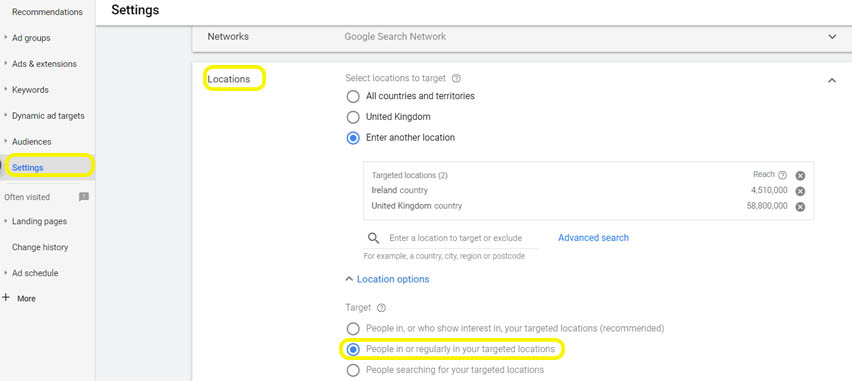
Check your location settings carefully. In most local or regional campaigns, you will usually want to target people who are physically located in your chosen areas, rather than people who have only shown an interest in those locations.
This is especially important for businesses that only serve a specific town, county or region. Otherwise, you may pay for clicks from people outside your service area who are unlikely to become customers.
4. Display Campaigns – Check The Placement
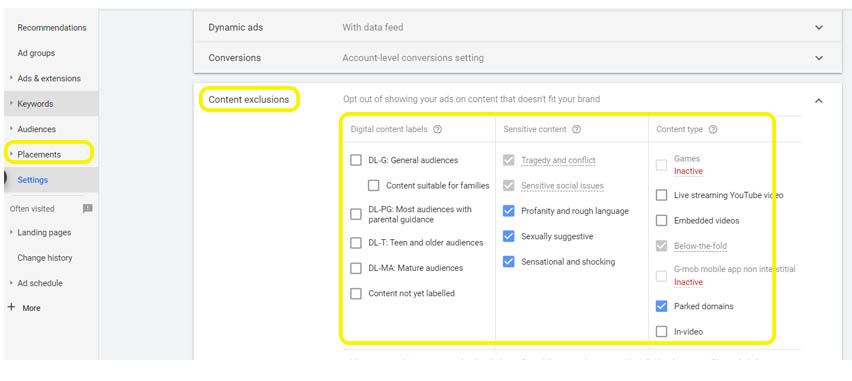
By default, display campaigns are set to show ads on all domains, regardless of the content. That’s not ideal for most businesses, as some placements just don’t deliver the right results. As a rule, we exclude seven types of placements that consistently underperform or aren’t suitable viewing platforms for the majority of businesses. These exclusions help reduce wasted spend and keep your ads in front of the right audiences.
5. Remarketing – Don’t lose that initial click
People click on your ad, great. Then what?
If they make a sale or enquiry, fantastic. If they don’t, you have still paid for that click, and there may still be value in trying to bring them back.
Remarketing can help you reconnect with people who have already visited your website, keeping your brand visible and encouraging them to return when they are ready to buy or enquire.
However, remarketing is not quite as simple as it once was. Audience sizes, tracking accuracy and campaign options can all be affected by cookie consent, privacy settings and how your tags are set up. For remarketing to work properly, you need the right tracking, consent setup and audience strategy in place.
For businesses with smaller amounts of traffic, remarketing audiences may take longer to build, so it is important to set realistic expectations.

Remarketing can often be a cost-effective way to stay visible to people who have already shown interest, but performance depends on your audience size, tracking setup, consent settings, creative and campaign structure. Beyond basic display ads, it’s time to think about other ways you can keep your audience engaged. For example, use Custom Audiences to target users who’ve previously visited your site but didn’t convert.
But don’t stop there. Consider a broader funnel strategy that re-engages users in different ways. For those who visited key pages or added items to a basket but didn’t complete a purchase, think about nurturing them with automated email follow-ups or remarketing ads featuring personalised offers or helpful content. You can also use segmentation to tailor your messaging:
-
-
- Top-of-funnel visitors (first-timers) might need educational content or guides to build trust.
- Mid-funnel visitors could be tempted by testimonials, product comparisons, or special offers.
- Bottom-of-funnel visitors (close to converting) may respond well to limited-time offers or compelling calls to action.
-
Once someone does convert, your follow-up strategy doesn’t have to stop there. Think about how you’ll build brand loyalty. Where appropriate, use remarketing, email follow-ups or customer lists to re-engage past customers with personalised offers, loyalty programmes, or updates about new products and services, keeping them connected to your brand for future purchases.
6. Use The Right Keyword Match Type
Keyword match types are still one of the most important parts of a Google Ads campaign, but they have changed a lot over the years.
Broad Match Modifier no longer exists, and phrase match now behaves differently from the old version. Google also uses much more intent-based matching, which means your ads may appear for searches that do not contain your exact keyword wording.
The main match types are now:
Broad match
Broad match gives Google the most flexibility. It can help find new searches and work well with strong conversion data and smart bidding, but it can also spend budget on irrelevant traffic if it is not managed carefully.
Phrase match
Phrase match gives more control than broad match while still allowing Google to match searches with similar meaning and intent. It is often a useful middle ground for campaigns where you want reach without going too broad.
Exact match
Exact match gives the most control, but it no longer means your ads will only appear when someone searches your keyword exactly. Google may still include close variants and searches with the same intent.
Negative keywords
Negative keywords are essential. They stop your ads from showing for searches that are irrelevant, low intent or unlikely to convert.
Key point: Do not rely on match types alone to control your campaign. Review your search terms regularly, add negative keywords and make sure your budget is being spent on searches that genuinely match your products or services.

7. Negative Keywords: Stop Wasting Money on Irrelevant Clicks
Negative keywords are essential to prevent your ads from showing for irrelevant searches. Unlike regular keywords, negative keywords are more specific—you’ll need to include all variations like plurals, misspellings, and related terms. Also, pay close attention to match types, as negative broad match can block related terms you didn’t intend to exclude.
Regularly review your Search Terms Report to find irrelevant queries and add them as negatives. Do this at least once a week to keep your campaigns clean and focused.
In the example below, we can see the keyword Window Cleaners (here shown in a historic match type—Broad Match Modifier), has generated a search for “magnetic window cleaners.” You can add the whole phrase as a phrase negative keyword, but also add the word “magnetic” as a broad match negative keyword, as it is unlikely to result in someone making an enquiry for your services.

8. Check You Are Tracking Meaningful Conversions
Google thrives on data. When you tell Google what you want your clicks to achieve—whether that’s leads, sales, or sign-ups—it learns how to get more of those conversions over time. But if your conversion tracking isn’t set up properly, Google has no idea what your goals are, let alone how to meet them. Ensure you’re tracking the right actions so the algorithm can work toward your objectives.
For lead generation campaigns, it is also important to think beyond simple conversion numbers. Not every enquiry is equal, so where possible, track which leads turn into genuine opportunities, bookings, sales or valuable customers. This helps you optimise for quality, not just quantity.
You should also make sure your cookie banner, Google tags and Consent Mode are set up correctly. Consent Mode helps Google tags adjust their behaviour based on each visitor’s consent choices, supporting more accurate measurement while respecting how users choose to be tracked.

Goals to Consider Setting Up for Conversion Tracking
-
-
- Phone Call Tracking: Google can track one phone number, so if you have multiple, consider switching to a central number. Ensure phone numbers are clickable on mobile.
- Email Clicks: Make sure your website allows email links to be clicked and tracked.
- Ecommerce Sales Tracking: Ensure your code records sales values to later leverage ROAS bidding.
- Form Fills: Redirect to a “thank you” page after form submissions so the URL can be tracked as a conversion.
-
Avoid tracking actions that don’t directly impact your bottom line as primary conversions. These include:
-
-
- Page Views: While useful for tracking engagement, they don’t reflect a valuable action.
- Time on Site: High time on site can mean interest, but it’s not necessarily tied to conversions.
- Low-Value Actions: Avoid setting up actions like newsletter sign-ups or social shares as primary unless they’re key to your business goals. Focus on high-value actions like purchases or lead submissions.
-
9. Is Your Website Up to the Task?
Your website is often the first interaction someone has with your business; it can be your best salesperson! Make sure it ticks the following boxes:
- Does it meet your customer’s needs and offer a solution?
Your content should clearly address the pain points of your target audience and present your product or service as the solution. - Is the language appropriate for your audience?
Avoid overloading your site with technical jargon or industry terms that might confuse visitors. Speak in a way that resonates with your target market. - Is there a clear, single call to action (CTA)?
Keep it simple. Too many CTAs can overwhelm users and lead to confusion. Aim for one clear action, or two at most, to guide users through their journey. - Is your site easy to navigate on all devices?
Whether your users are on desktops, tablets, or mobiles, navigation needs to be intuitive. Be mindful of small screens—check that links aren’t too close together for fingers to click easily. - How fast is it to load?
If your website is slow, you will be losing customers. Use tools such as Google PageSpeed Insights to check how your website performs on mobile and desktop, including loading speed, layout stability and overall user experience. - Is the site responsive and mobile-friendly?
Ensure that the layout adjusts well on mobile devices. Are text sizes readable? Do images resize properly? Are phone numbers clickable for easy contact? Test it thoroughly across various devices. - Maximise the “Above the Fold” Section
The above-the-fold section (what visitors see before they need to scroll) is the most valuable part of your website. It should instantly show visitors that they’ve landed on the right site and that you can solve their problem. Make sure it includes: - A headline that grabs attention.
- A subheading that explains your value.
- A clear CTA to encourage the next step.
-
-

10. We’re all different! Don’t neglect segmenting your audience
You’ve probably experienced this yourself, seeing ads for something you just purchased. It’s not only irrelevant but can be downright frustrating. This happens when advertisers don’t segment their audience properly. The same ad is shown to everyone, regardless of their position in the buying journey. Worse, this can leave a negative impression, making potential customers feel like you don’t know or care about their needs.
Solution: Effective audience segmentation ensures that you’re sending the right message to the right people, reducing wasted spend and improving user experience. Here’s how to fix it:
-
-
-
New Visitors: These users aren’t ready to buy yet, so overwhelming them with hard-sell ads might turn them away. Instead, use introductory ads to educate them on your brand and offerings. For example, offer free guides, video content, or brand awareness campaigns.
-
Returning Visitors: They’ve shown interest but haven’t taken the plunge yet. Maybe they need a push, like a special offer or a testimonial, to help make a decision. Use remarketing ads that speak to the benefits of your product and encourage them to take that next step.
-
Recent Customers: Don’t make the mistake of showing ads to someone who’s just purchased from you. Instead, target them with ads that offer complementary products, loyalty incentives, or updates on new products. This keeps them engaged without frustrating them with irrelevant ads.
-
Cart Abandoners: This is a high-value group. These are users who were close to converting but got distracted or had doubts. Show them ads reminding them of their items with incentives like free shipping or limited-time offers to reel them back in.
-
-
By segmenting your audience, you avoid wasting ad spend on irrelevant groups and improve the overall customer experience. This not only makes your ads more effective but also builds trust with your audience. Nobody likes seeing irrelevant ads, and poor segmentation can do more harm than good.
Key Tip: Regularly review your search queries and audience performance to ensure your segments stay relevant and effective.

11. Not Excluding the 18-25 Age Group When Irrelevant
If your product or service is not aimed at younger audiences, it is worth reviewing how the 18–25 age group performs. In some accounts, this age group may generate clicks without converting, especially if the offer is priced or positioned for an older demographic.
Solution: Review your age demographic data before making exclusions. If the 18–25 age group is spending budget without generating meaningful conversions, you may choose to exclude it or reduce focus on that segment. If it performs well, keep it in.

Final Thoughts: Maximise Your Google Ads Success
Avoiding these common PPC mistakes can make all the difference between wasted spend and a well-optimised, high-performing Google Ads campaign. Whether it’s setting your budget based on leads, tracking the right conversions, or properly segmenting your audience, each step helps fine-tune your strategy. Remember, Google Ads thrives on data, and the more you optimise, the better the results. Stay on top of your campaigns, make adjustments as you go, and you’ll see the returns you’re looking for.
Want to read more? You might be interested in these...

Recent Comments